Start with a ten-minute cable inventory
A tidy desk does not require a new desk or a complicated setup. Before buying organizers, unplug devices you can safely disconnect and trace each cord from the device to its outlet or power strip. Set aside cables you no longer use, and separate cords that travel with a laptop or phone from those that can stay at the desk. This first pass makes the project smaller: you are arranging the cables you actually need, not finding storage for every spare cord you own.
Notice where the trouble happens. Do cords fall behind the desk when unplugged? Are they visible across the work surface, tangled near your feet, or difficult to tell apart? Choose one or two problems to solve first. Keep a small amount of slack for anything you move regularly, such as a keyboard or adjustable monitor. A cable pulled tight may look neat briefly but can become inconvenient when you shift your setup.
Give each cable a sensible route
Group cables by destination rather than bundling every cord together. For example, guide monitor and computer cables toward the back of the desk, while keeping charging leads within comfortable reach. If the desk has a leg or rear support, that may offer a route from the desktop toward the outlet without drawing attention to the cords. Route cables away from chair wheels, drawers, and places where feet might catch them.
Test the route before securing anything. Sit down, move your chair, open drawers, and adjust any equipment you normally reposition. Leave enough slack at connection points so plugs are not under strain. If a cord needs to cross a walkway, rethink the device or outlet location instead of relying on a cover that might still be in the way. The goal is a setup that works during an ordinary day, not just in a photo.
Use organizers you can remove
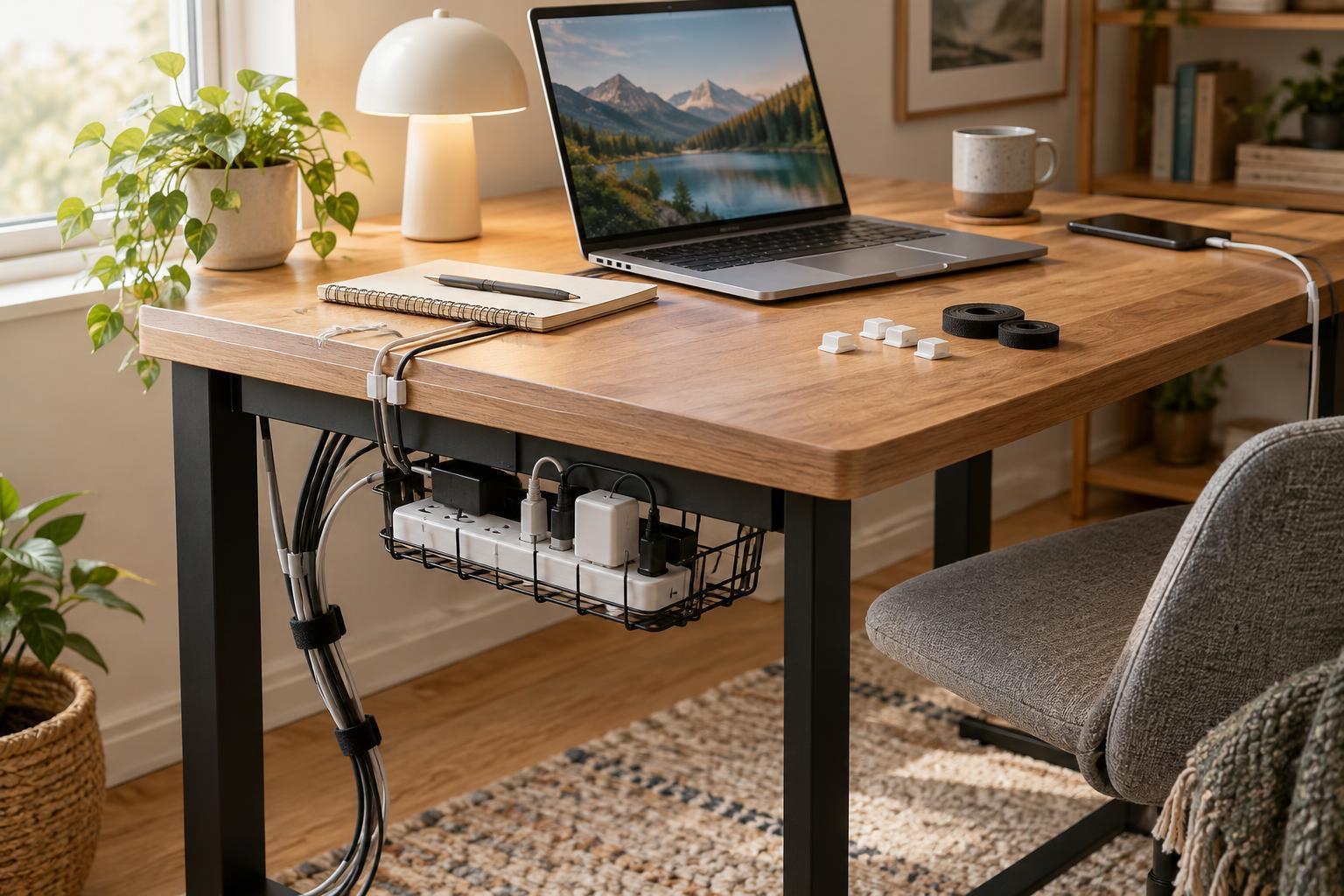
Reusable hook-and-loop ties are useful for gathering extra length because you can open them whenever the setup changes. Wrap them loosely enough to avoid crushing cables, and keep power adapters and plugs accessible. Small freestanding cable holders can stop charging leads from slipping off the desk. A tray or box can collect spare cables that are not in use, so they do not get mixed into the active setup.
For cables that need to follow an edge, consider removable clips or ties around a desk leg. Check that a clip fits the cable without pinching it. If you use an adhesive-backed product, follow its removal directions and test it in a less visible spot first; even products described as removable may affect some finishes. Renters and anyone with a delicate desk surface can skip adhesive entirely and use freestanding holders, reusable ties, or existing desk features instead.
Keep the power area accessible
A power strip can be the most crowded part of the setup. Place it where you can reach it to unplug a device or inspect a connection, rather than burying it behind a tightly packed bundle. Follow the strip's instructions, avoid overloading it, and do not cover power adapters or other equipment that needs airflow. If a plug, cord, or outlet looks damaged, stop using it rather than trying to hide the problem with an organizer.
Labeling can save time without adding visual clutter. A small removable label near each plug can identify a monitor, lamp, or charger before you disconnect anything. Leave enough room to grasp plugs instead of pulling on cords. These choices may be less invisible than a fully concealed arrangement, but they make it easier to change the desk safely when you swap devices or rearrange the room.
Finish with a reset you can repeat
Once the main cables are routed, put the devices back in place and use the desk for a few minutes. Reach for a charger, move your chair, and check whether anything snags or falls out of reach. Adjust one awkward cable at a time. You do not need to disguise every wire; a few visible, easy-to-follow cords can be more useful than a bundle that is hard to untangle.
Give spare cords a designated home and keep one reusable tie nearby for new arrivals. When you add or remove a device, trace its cable and update the route rather than pushing another loop behind the desk. That small habit helps the setup stay manageable, while the removable pieces let you change your mind whenever your workspace changes.